
Visual Drag-and-Drop Canvas
Build your bot flow visually with trigger, message, reply, interactive button, list section, and reference (jump) nodes. No coding required.
Platform & Channels
Integrations & App Store
Design a professional WhatsApp bot on a visual drag-and-drop canvas, or describe it in Arabic or English and let AI build the entire flow for you. Preview and test it live before going live.
AI-generated, with a live test simulator before you publish.
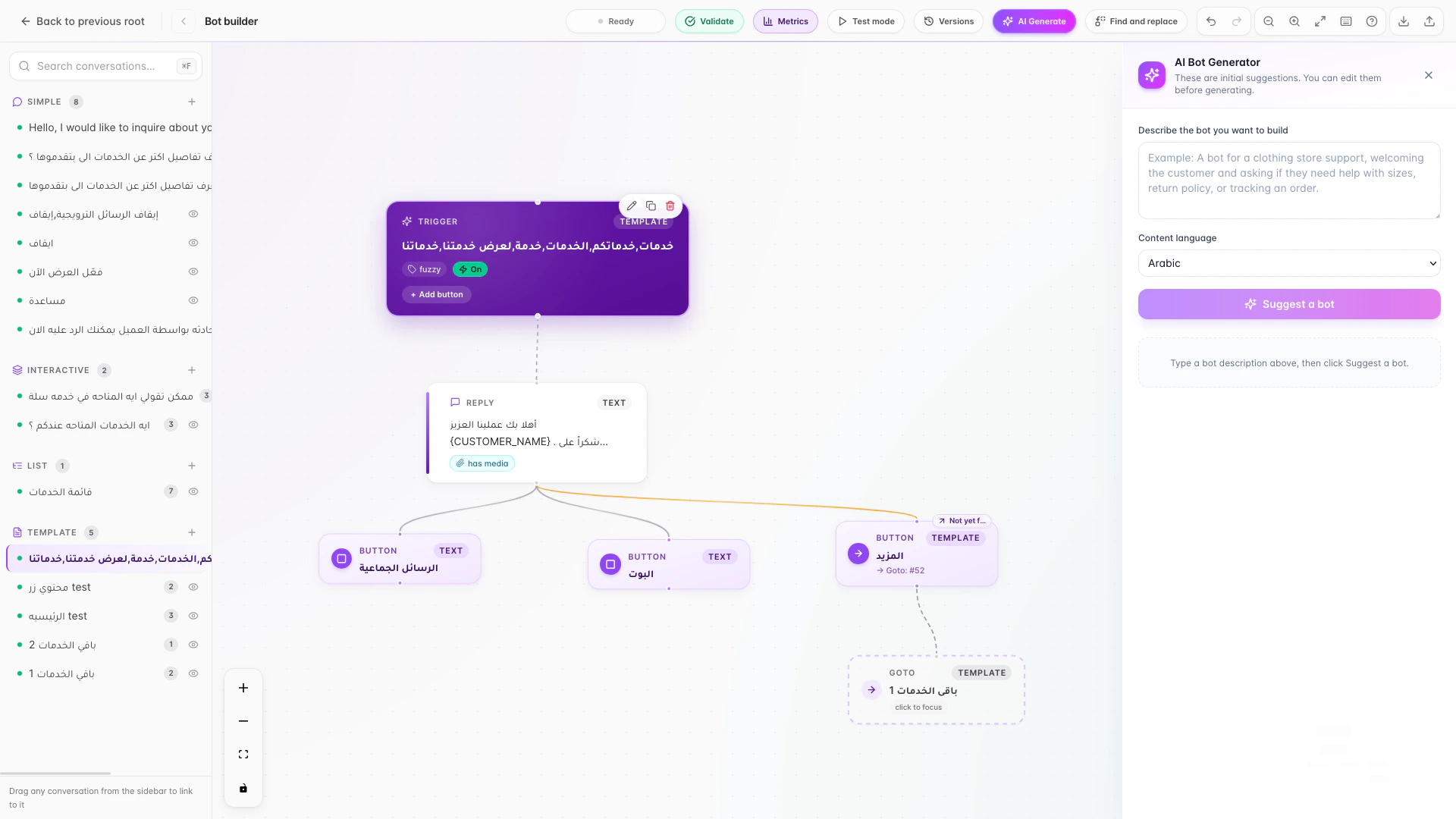
Build your bot flow visually with trigger, message, reply, interactive button, list section, and reference (jump) nodes. No coding required.
Describe what you want in Arabic or English, and AI builds the entire flow. Edit it before applying, or regenerate from scratch.
Test your bot inside the builder and see which step matches and the exact path it takes, without sending any real messages to customers.
Send text, image, video, audio, file, GIF, sticker, link, contact, location, WhatsApp templates, and list messages, all from the same canvas.
Add interactive reply buttons and sectioned list menus that render as native WhatsApp buttons and lists, giving customers a smooth, tappable experience.
Enable AI-trained replies with a "try AI first" option and AI working hours, and connect it to your store, calendar, and custom webhooks as tools and knowledge.
Address each customer by name with variables like {CUSTOMER_NAME}, phone, email, and city, and set business hours, weekdays, and date ranges per flow.
Auto-saved versions with one-click restore and manual checkpoints, A/B testing of button variants with analytics, and real-time collaboration showing who is editing, plus notes and annotations.
Write a description in Arabic or English and let AI build the whole flow, or start yourself on the visual drag-and-drop canvas.
Add 12+ message types, interactive buttons and lists, personalization variables, per-flow scheduling, and handoff to a human agent when needed.
Use the simulator to test the path and trace every step without sending real messages, then launch your bot on WhatsApp and your other channels.
The builder works fully in Arabic with RTL support and in English. Write the AI description in either language, and set separate reply variants per step in Arabic and English.
Instead of building step by step by hand, describe your bot in a sentence and let AI lay the foundation, then refine, test, and launch in far less time.
LetsBot is an official Meta Business Partner, and buttons and lists render as native WhatsApp elements for a trusted, compliant customer experience.
Test every flow in the simulator without sending real messages, and rely on auto-saved versions and one-click restore to try any change safely.
Start Building Your Bot — and run every conversation from one place.
Start Building Your BotDig deeper