Do you feel your `lead nurturing` efforts are lost in a sea of unopened emails or unanswered phone calls? In today's competitive business world, it's no longer enough to merely attract `leads`; the crucial part is how you `nurture` them and build strong `customer relationships` until they become loyal clients. This is where the powerful combination of HubSpot, a leading `CRM` platform, and `WhatsApp`, an integral part of our daily lives, comes into play. Integrating these two tools opens new horizons for `WhatsApp lead nurturing`, transforming the follow-up process from a burden into a true `competitive advantage`.
Imagine every `lead` receiving a `personalized message`, at the right time, through their preferred channel. This isn't a distant dream; it's a reality achievable through HubSpot WhatsApp integration. In this article, we'll dive into how to leverage this powerful duo to maximize your `marketing and sales efforts` and elevate your `conversion rates` to unprecedented levels.
Why `WhatsApp Lead Nurturing` with `HubSpot` is an Unbeatable Duo?
At the heart of any successful `WhatsApp lead nurturing strategy` lies the ability to communicate effectively and personally. `WhatsApp` offers an instant and highly `personalized communication` channel, where messages reach the lead's pocket directly and are read at rates far exceeding traditional emails. When this direct interaction is integrated with `HubSpot's` power in `data organization`, `task automation`, and `customer journey tracking`, you get an unparalleled `integrated system`.
This partnership allows you to understand `lead behavior` more deeply, identify their `pain points`, and offer the right solutions at the right moment. As an official `Meta Business Partner`, `LetsBot` provides access to the Official WhatsApp Business API, ensuring your messages are reliable, policy-compliant, and scalable to meet your growing business needs. This integration isn't limited to sending messages; it extends to `data collection`, `customer record updates`, and seamlessly moving them through the `sales pipeline`.
Unique `WhatsApp` Advantages in the `Lead Nurturing Journey`
`WhatsApp` boasts several features that make it an ideal channel for `HubSpot customer follow-up` and nurturing. Far from being just a messaging app, it has evolved into a powerful `marketing, sales, and support tool`. Here are its key advantages:
- Very High Open and Read Rates: Compared to email, which might only achieve 20-30% open rates, `WhatsApp` messages boast open rates of 90% or more, ensuring your message reaches the `lead`.
- Personal and Direct Communication: `Leads` feel they receive `individual attention`, which `builds trust and loyalty`. You can address them by name and `personalize content` to match their interests.
- Multimedia Support: You can send images, videos, documents, and even voice messages, making the content more `engaging and interactive` and helping to better `explain products and services`.
- Instant Replies: `WhatsApp` allows `leads` to ask questions and get `quick answers`, accelerating the `decision-making process` and `reducing the chances of lost interest`.
- Build Small Communities: `WhatsApp groups` (while observing privacy and Meta policies) can be used to provide `exclusive content` or support to a specific group of `leads` with `shared interests`.
- Flexibility in Message Types: Whether it's a `welcome message`, an `abandoned cart reminder`, a `product update`, or a `webinar invitation`, `WhatsApp` provides the necessary `flexibility` to send various types of `targeted messages`.
`WhatsApp Lead Nurturing Automation`: The Power of `HubSpot Workflows`
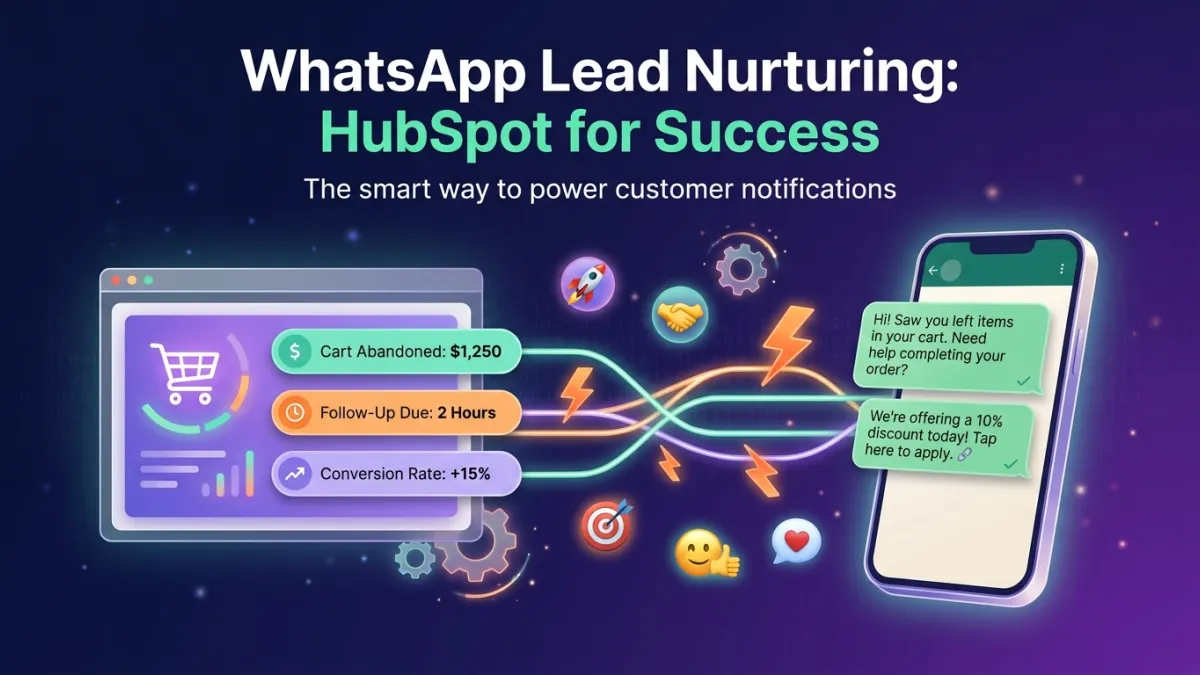
The true power of `integrating WhatsApp with HubSpot` lies in the platform's ability to `automate WhatsApp lead nurturing` processes through its `Workflows feature`. This feature allows you to create `automated message sequences` sent based on `lead behavior`, data, or their stage in the `sales pipeline`. Imagine the following scenarios:
- Personalized Welcome Messages: When a `lead` fills out a form on your website, `HubSpot Workflows` can `instantly send a WhatsApp welcome message`, containing a link to a useful resource or an invitation to a conversation with a `sales rep`.
- Abandoned Cart Recovery: If a `lead` abandons their shopping cart, `HubSpot` can detect this and send a `gentle WhatsApp reminder`, perhaps with a `special offer` to encourage them to `complete the purchase`.
- Post-Download Follow-up: After a `lead` downloads a guide or ebook, a `WhatsApp follow-up message` can be sent offering more `relevant information` or `inviting them to a demo`.
- Status Updates and Notifications: `WhatsApp` can be used to send `automatic notifications` about `order status`, `service updates`, or `appointment reminders`, enhancing the `customer experience` and `reducing the support burden`.
This `automation` not only `saves time and resources` but also ensures that every `lead` receives the right `attention at the right time`, significantly `increasing their chances of converting` into `loyal customers`. `LetsBot` can facilitate this integration and provide you with the necessary `tools to maximize this automation`.
Practical Steps to `Integrate WhatsApp with HubSpot` and `Start Nurturing Your Customers`
To maximize the benefits of a `WhatsApp lead nurturing strategy`, follow these practical steps to integrate the two platforms and build your campaigns:
Step 1: `Connect WhatsApp Business API to HubSpot via LetsBot`
The first and most crucial step is to `integrate the WhatsApp Business API` with your `HubSpot account`. `LetsBot` provides this capability seamlessly, allowing you to connect your `LetsBot` account to `HubSpot` to enable `two-way data flow`. This link ensures that all `WhatsApp interactions` are `automatically recorded` in `HubSpot`, providing a `comprehensive view` of each `lead's journey`.
Step 2: `Segment Your Leads`
Before you start sending messages, you need to `segment your leads in HubSpot`. You can divide them based on their `interests`, `website behavior`, source, or their stage in the `sales pipeline`. For instance, you might have a segment for `leads` who visited a specific `product page` and another for those who `downloaded specific content`. This segmentation is essential for `personalizing your messages`.
Step 3: `Craft Engaging and Effective WhatsApp Messages`
Once segments are defined, it's time to `craft WhatsApp messages` that are `compliant with Meta policies` and `engaging for your audience`. Messages should be `concise, clear, and valuable`. Use `links, images, or videos` if appropriate. Remember, the goal is to `build relationships` and `provide value`, not just to sell. The AI WhatsApp Bot Guide 2026 can be used to create more `interactive and personalized messages`.
Step 4: `Build Custom HubSpot Workflows`
Here lies the `power of automation`. Within `HubSpot`, you can build `Workflows` that do the following:
- Define Trigger Points: When does the `lead` enter this `Workflow`? (e.g., `form submission`, `page visit`, `specific property update`).
- Set Conditions: What `conditions` must the `lead` meet to receive a `WhatsApp message`? (e.g., `didn't open a previous email`, `no interaction within 24 hours`).
- Add WhatsApp Actions: Set up actions to `send specific WhatsApp messages`. You can use `pre-approved Meta message templates`, which can be `personalized with lead data stored in HubSpot`.
- Add Time Delays: Ensure there are `appropriate time delays between messages` to `avoid annoying leads`.
- Track Interactions: Set up `conditions to exit the Workflow` or `move to another path` based on the `lead's interaction with WhatsApp messages` (e.g., if the `customer replied`, or `clicked a link`).
Step 5: `Analysis and Continuous Optimization`
After `launching your campaigns`, don't stop there. Use `HubSpot dashboards` to `analyze the performance of your WhatsApp messages`. `Monitor open rates, clicks, and conversions`. `A/B test different messages` to see what gets the best response. `Optimize your Workflows` based on the data you collect to ensure the best results for `HubSpot customer follow-up`.
Best Practices for Ensuring Successful `WhatsApp Lead Nurturing Campaigns`
To `maximize the impact` of your `WhatsApp lead nurturing efforts`, it's crucial to `adhere to best practices`. These practices not only ensure `compliance with Meta policies` but also `enhance the lead experience` and `build trust`:
- Obtain Explicit Consent: Always ensure you have `explicit consent` from `leads to receive WhatsApp messages` from you. This `consent` can be collected via `opt-in forms` on your website or during the `registration process`.
- Personalize Messages: Use `HubSpot data to personalize each message`. Addressing the `lead by name` and referring to their `interests or past interactions` increases `engagement`.
- Message Timing: Send messages at times when `leads are most likely to engage`. Avoid sending `late at night or at inappropriate times`.
- Provide Value First: Before attempting to sell, focus on `providing value to the lead`. This could be in the form of `useful tips`, `educational content`, or `exclusive offers`.
- Quick Response to Inquiries: If a `lead` replies to your message, ensure your team is ready to `respond quickly and effectively`. `LetsBot` can support you with its `multi-agent live chat` feature to ensure no inquiry is missed.
- Comply with Local and International Regulations: Adhere to `data protection regulations` like `GDPR` and regional regulations (e.g., `CITC in Saudi Arabia`, `TDRA in the UAE`). `LetsBot ensures your compliance` with these regulations.
- Balance Automation and Human Interaction: While `automation provides efficiency`, don't completely forgo the `human touch`. Use `automation for repetitive tasks`, and reserve `human interaction` for more `complex conversations` or the `final stages of the sales process`.