Nothing falls through
A new lead is assigned, tagged and given a follow-up task the moment the first message arrives, even at night.
Channels & Apps
AI & Automation
Integrations & App Store
Business Tools
AI customer engagement platform · Workflows
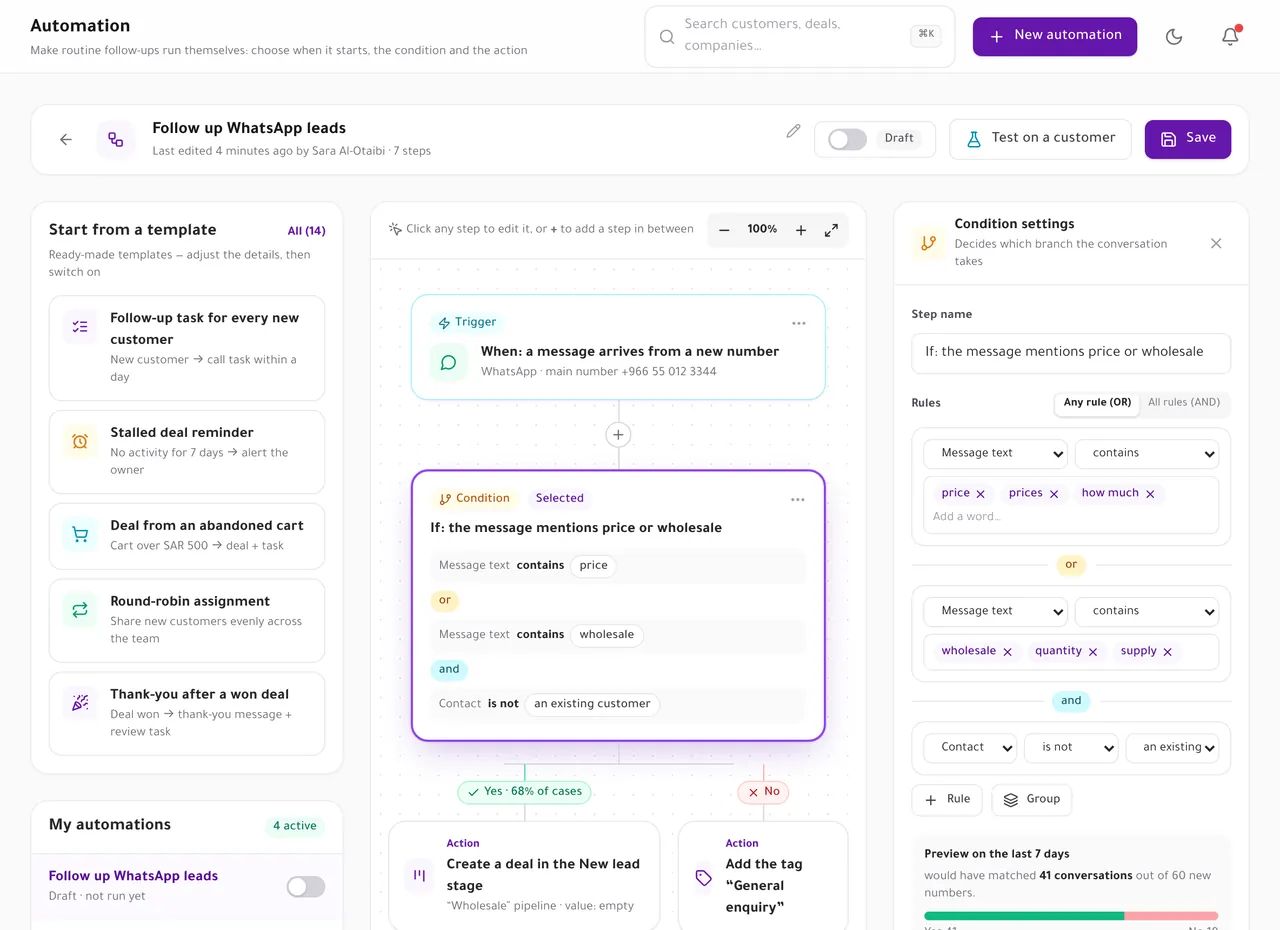
Choose what starts a workflow, the conditions it checks and the steps it runs. LetsBot assigns the chat, updates the CRM, sends an approved template and waits for the next step, while your team keeps the final say.
Workflows are part of the free LetsBot CRM. LetsBot is a verified Meta Tech Provider.
Why workflows
Most lost sales are slow replies and forgotten follow-ups. A workflow does the routine part the same way every time.
A new lead is assigned, tagged and given a follow-up task the moment the first message arrives, even at night.
Deals move stage, fields change and notes are added by the workflow, so reports show what really happened.
Approval steps, quiet hours, daily caps and a test run on one customer keep automation from surprising your customers.
What a workflow can do
Start from a ready template or a blank canvas, then add steps, waits and branches.
An incoming message, a new or changed record, a deal stage, a won or lost deal, a store order, an abandoned cart, a lead ad, a paid payment link, a booking, a submitted form, an overdue task or no activity for a while.
Check the message text, contact, deal or company fields and custom fields with AND/OR rules, then send each case down its own branch.
Create a task or a deal, move a stage, update a field, add a tag or a note, and assign an owner, including round-robin across the team.
Send an approved WhatsApp template, enrol the contact in a sequence, or send an e-mail or SMS through your own sender.
Wait minutes or days, pause for a team member to approve, or call your own system with a webhook.
Let AI classify, summarise or extract details from the conversation and use the result in the next condition.
Is it for you
In CRM › Automation, open a ready template such as «follow-up task for every new customer».
Choose what starts the run and which contacts or deals it applies to.
Add actions, waits, branches and approvals, then test the workflow on one customer.
Activate the workflow and follow every run in the contact timeline.
Pricing
Workflow automation
Free
part of the LetsBot CRM, on every plan
Bundles start at US$69 a month, VAT included, and every account starts with a 14-day free trial.
Workflows come with the base CRM on every plan. Compare the bundles, or build a package with only the services you need.
Start a free trial, open a ready template and test it on one customer before you switch it on.
Choose what you allow. You can change this at any time from “Cookie settings” at the bottom of every page. Privacy Policy
Essential
Needed for the site to work and stay secure: session, form protection, language memory and bot checks.
Analytics
Help us understand how pages are used and improve them, through Microsoft Clarity, which records page interactions such as clicks and scrolling.
Marketing
Measure how well our ads work, through Google Ads, the Meta Pixel and ChatGPT ads by OpenAI, including what our servers send to Meta and OpenAI.