
LetsBot CRM
A CRM built into WhatsApp, free on every plan
Customers, companies, deals, quotes and follow-ups in one record next to the conversation, so your team sells from the chat it already works in.
Free on every planOpen it from the sidebar → CRM. No extra charge on any LetsBot plan.
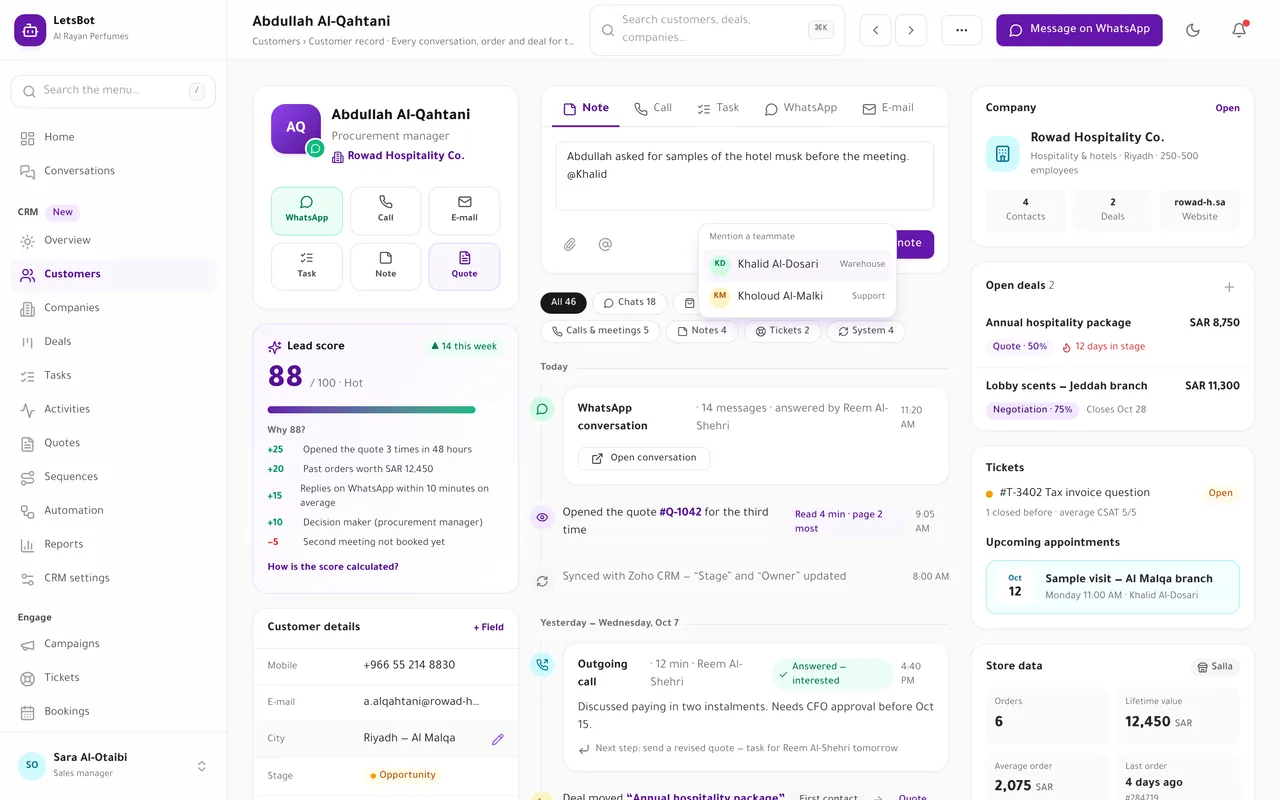
LetsBot CRM screens, shown with sample data.
It fills itself
Your channels, stores and tools write to the same record
Connect them once in LetsBot. New conversations, orders, payments and meetings land on the customer’s timeline without anyone re-typing them.
- Conversations on WhatsApp, Messenger, Instagram, e-mail and website chat, summarised per day.
- Store orders from Salla, Zid, Shopify, WooCommerce and Magento, with lifetime value, order count and last order.
- Payments from your Stripe account, and meetings from Google Calendar, Microsoft, Cal.com and Calendly.
- Deals, tasks, tickets, appointments and quotes, each with who did what and when.
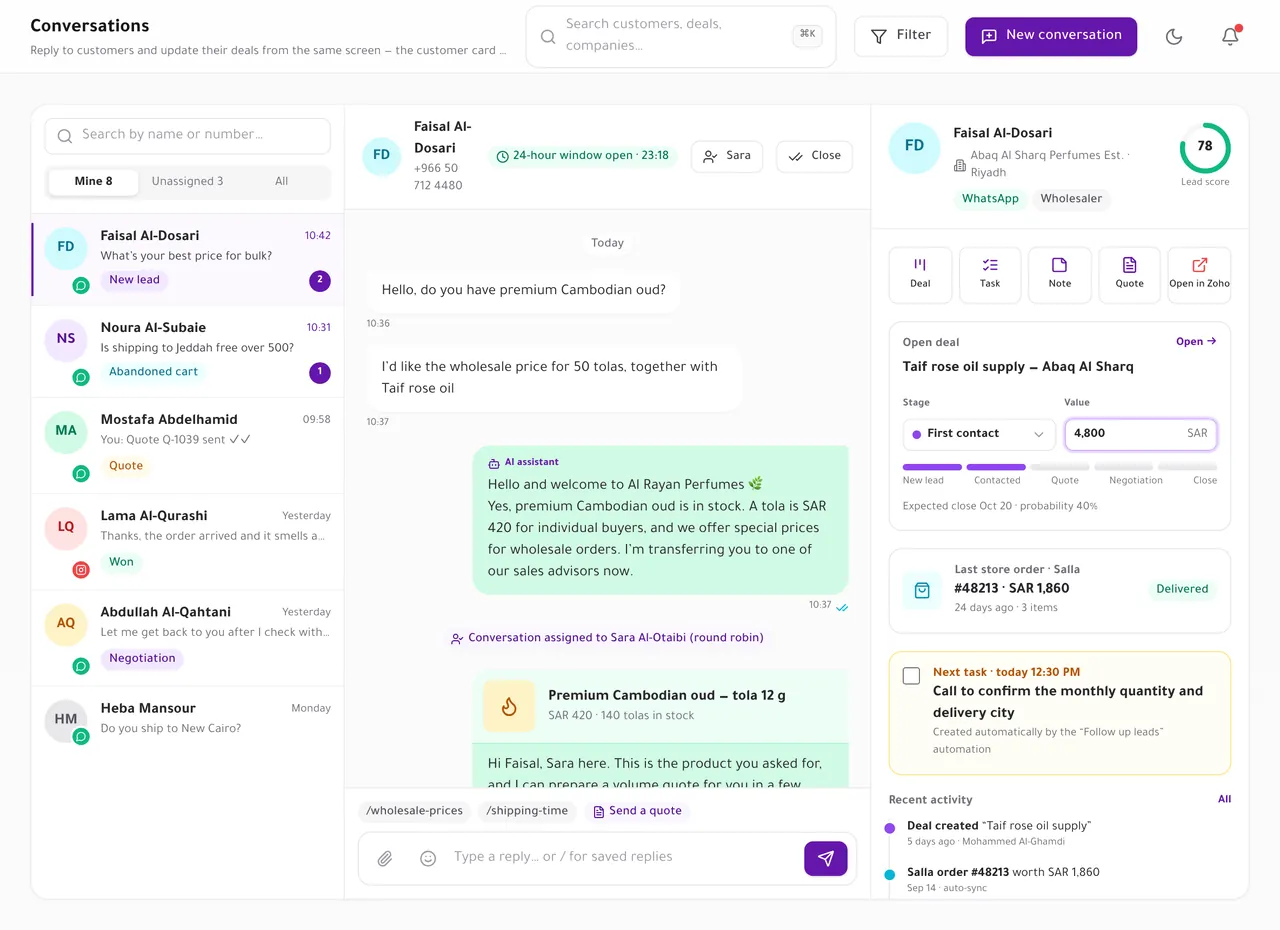
In the conversation
Sell from the chat your team already works in
A CRM card sits beside every live-chat conversation, so the agent knows who they are talking to before they reply.
- The company, the lead score and its top reasons, open deals with stage and amount, the last store order and the next task.
- Create a deal, a task, a note or a quote without leaving the conversation.
- The latest timeline items, so nobody asks the customer the same question twice.
Deals
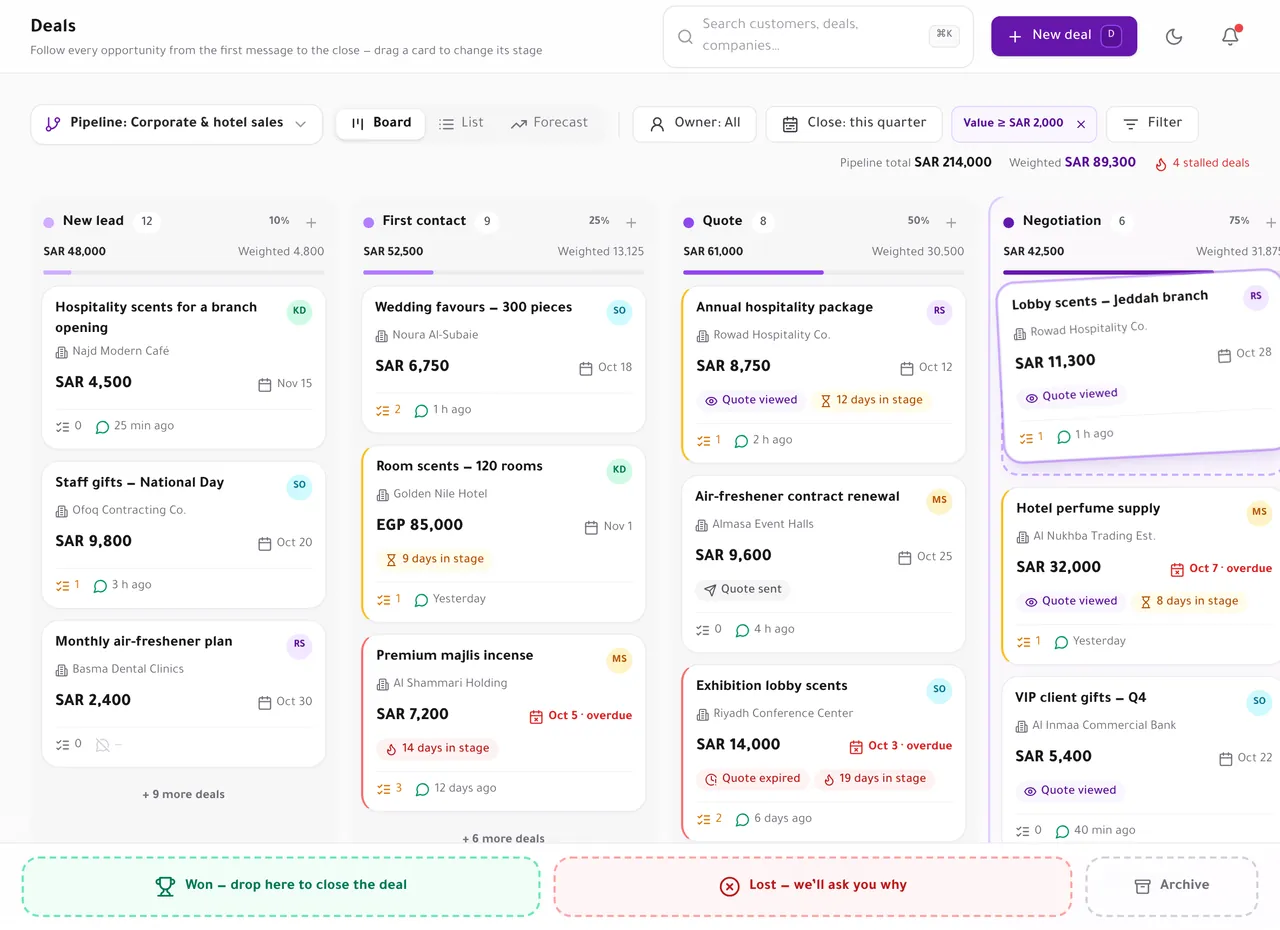
A pipeline that shows what is really coming in
Drag deals across stages. Every column shows its total and its value weighted by the stage’s win probability.
- Up to 20 pipelines with 30 stages each: sales, renewals, wholesale or projects.
- Deals that sit too long in a stage, and close dates that have passed, are flagged on the card.
- Mark a deal lost and pick the reason, so reports show why deals slip.
Everything about the deals pipeline Read the guide: Deals and pipelines: forecast, products and follow-up alerts
Customers and companies
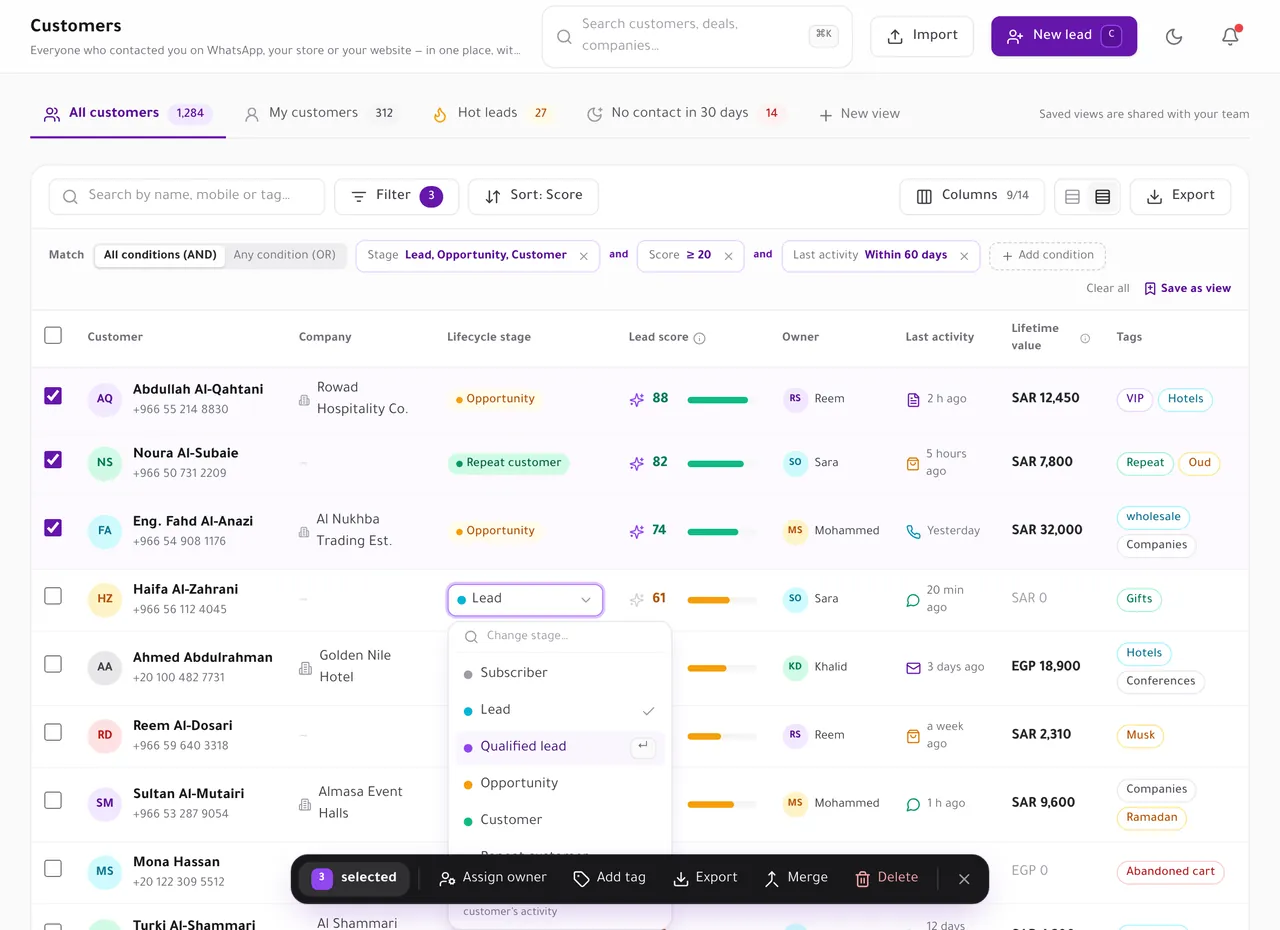
The lists your team opens every morning
Customers and companies in one table, with the lead score beside every name.
- Saved views as tabs, with AND/OR filters, chosen columns and sorting — up to 50 per list, private or shared with your team.
- Bulk actions on the selected customers: assign an owner, add a tag or delete.
- A 0–100 lead score from conversations, quotes, orders and the pipeline, with every point explained.
Quotes
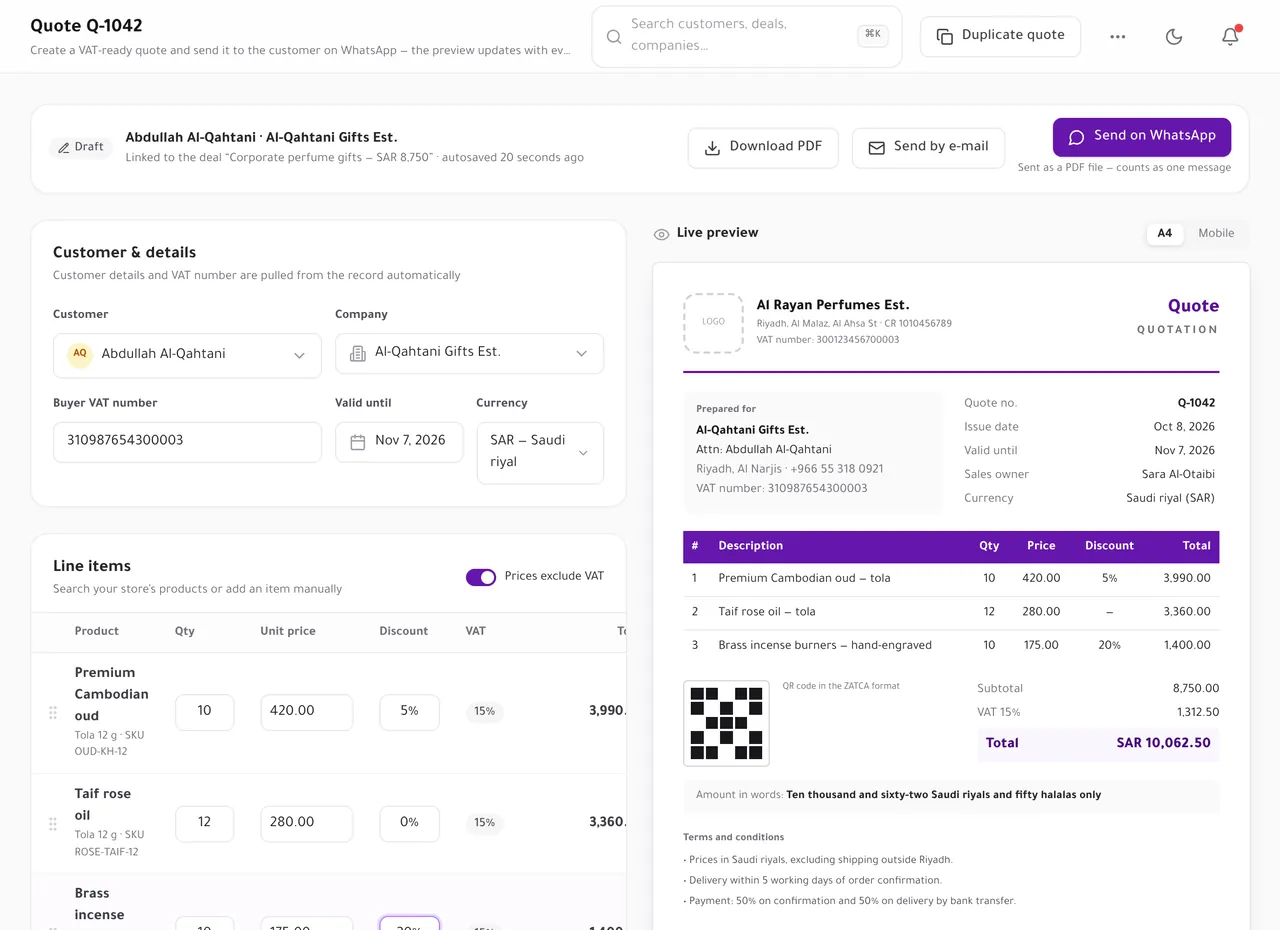
Quotes your customer can accept from WhatsApp
Build a quote from your store’s products, send it as a PDF on WhatsApp or by e-mail, and see when the customer opens it.
- Discounts, VAT and a QR code in the ZATCA format, with the buyer’s details pulled from the record.
- The customer accepts or declines online. LetsBot takes no payment on a quote.
- Opened, accepted and declined quotes appear on the customer’s timeline and in the reports.
Read the guide: Quotes: create, send on WhatsApp and track when they are opened
Automation and sequences
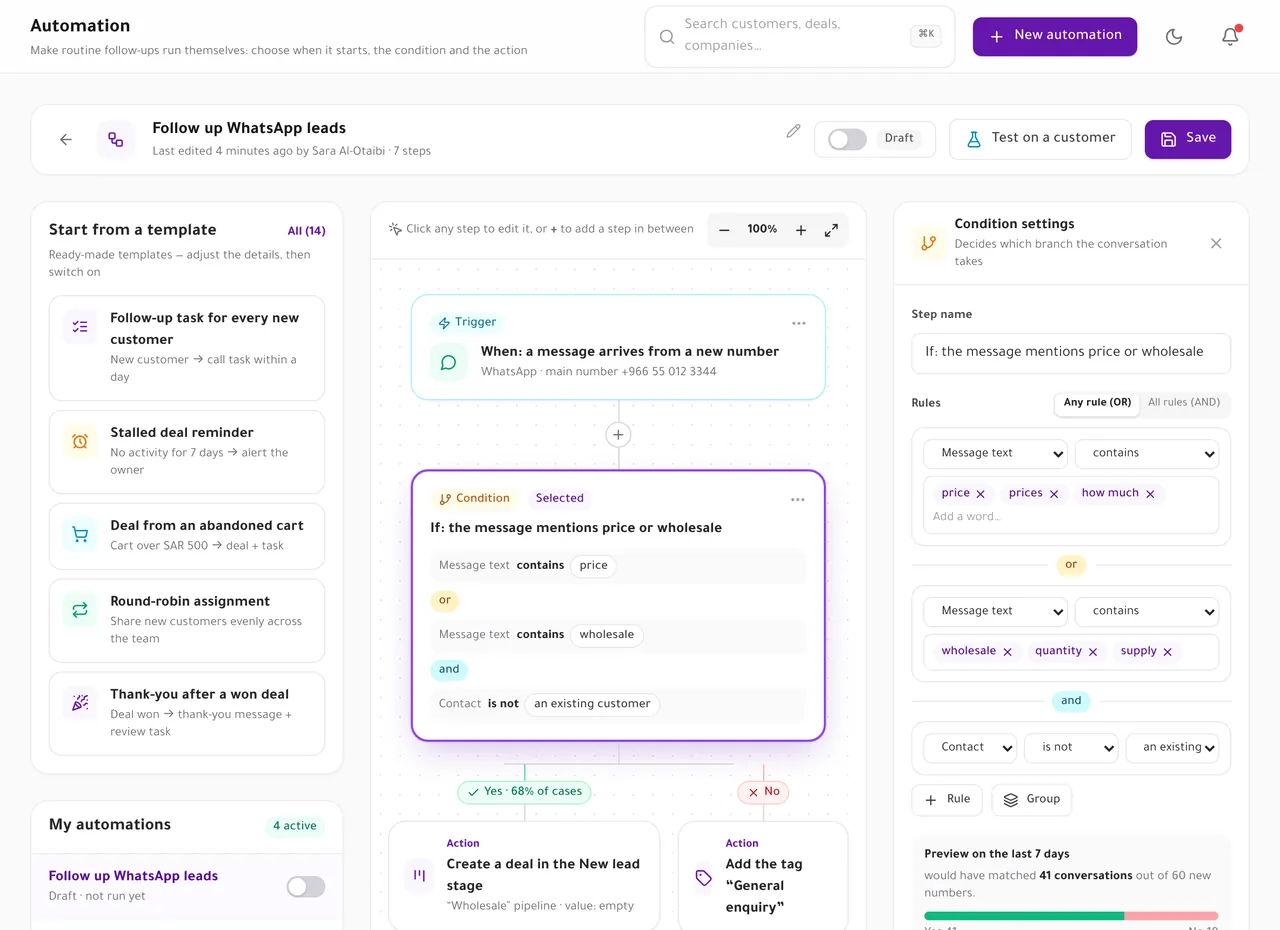
Follow-ups that run on time, every time
A trigger, conditions and actions: create a task, assign an owner, move a stage or send an approved WhatsApp template.
- Start from ready-made templates: a task for every new customer, a reminder for stalled deals, round-robin assignment.
- Sequences send follow-ups with approved templates and stop when the customer replies.
- Steps that message a customer stay off until you switch them on and confirm the cost, with a daily cap.
The CRM costs nothing. Messages it sends to customers — a quote on WhatsApp, an automation or sequence template — are WhatsApp messages that Meta bills like any other. Every step that messages a customer stays off until you switch it on and confirm the cost.
Read the guide: Automation, sequences and what WhatsApp messages cost
Reports and goals
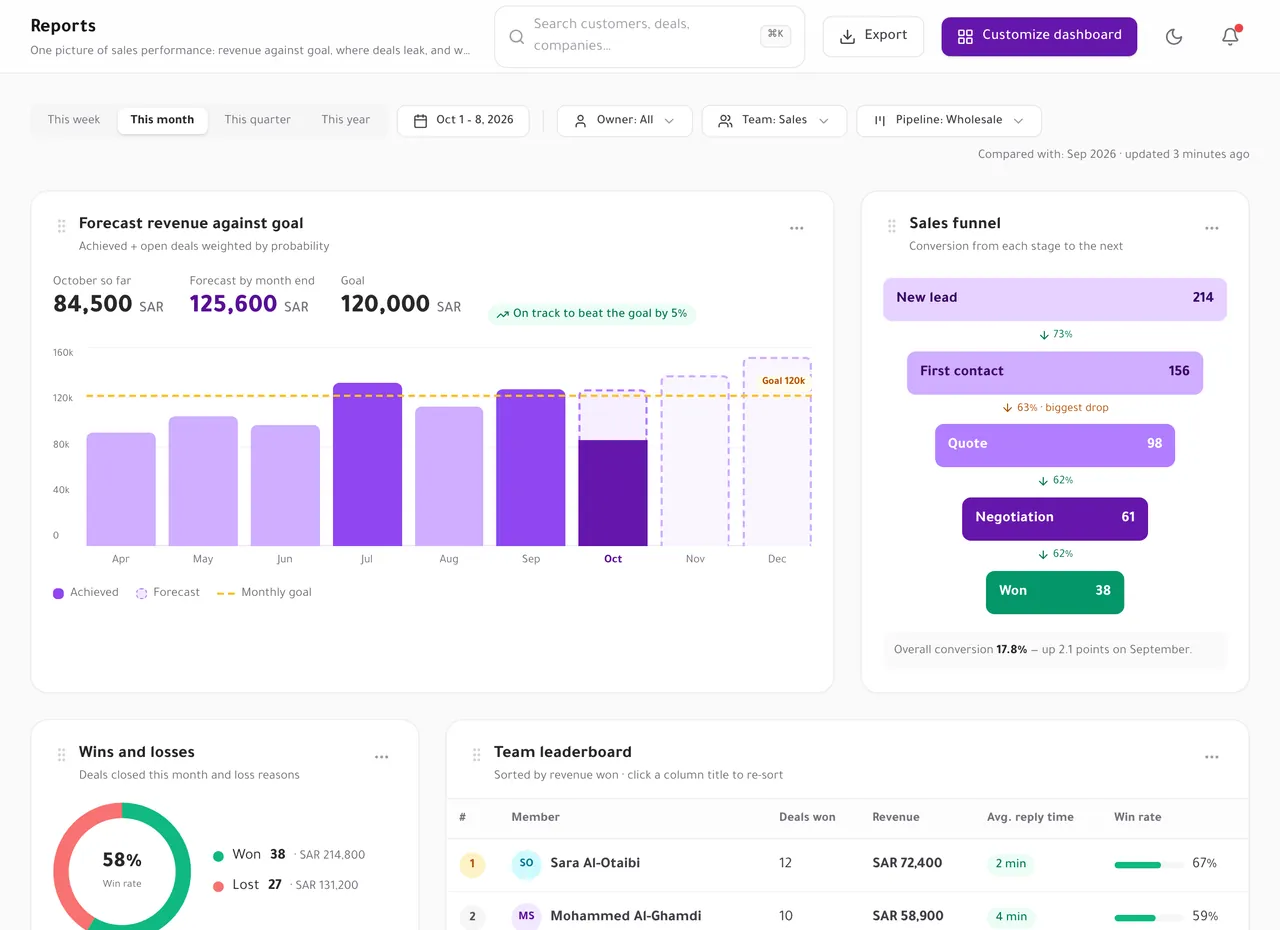
Know where revenue comes from, and where deals leak
Dashboards you arrange yourself, filtered by period, team and pipeline.
- Revenue against the monthly goal, with the forecast from open deals.
- The sales funnel stage by stage, wins and losses with their reasons, and the team leaderboard.
- Lead sources, deal velocity and quote conversion.
Clean data
Bring your customers in, and keep the records clean
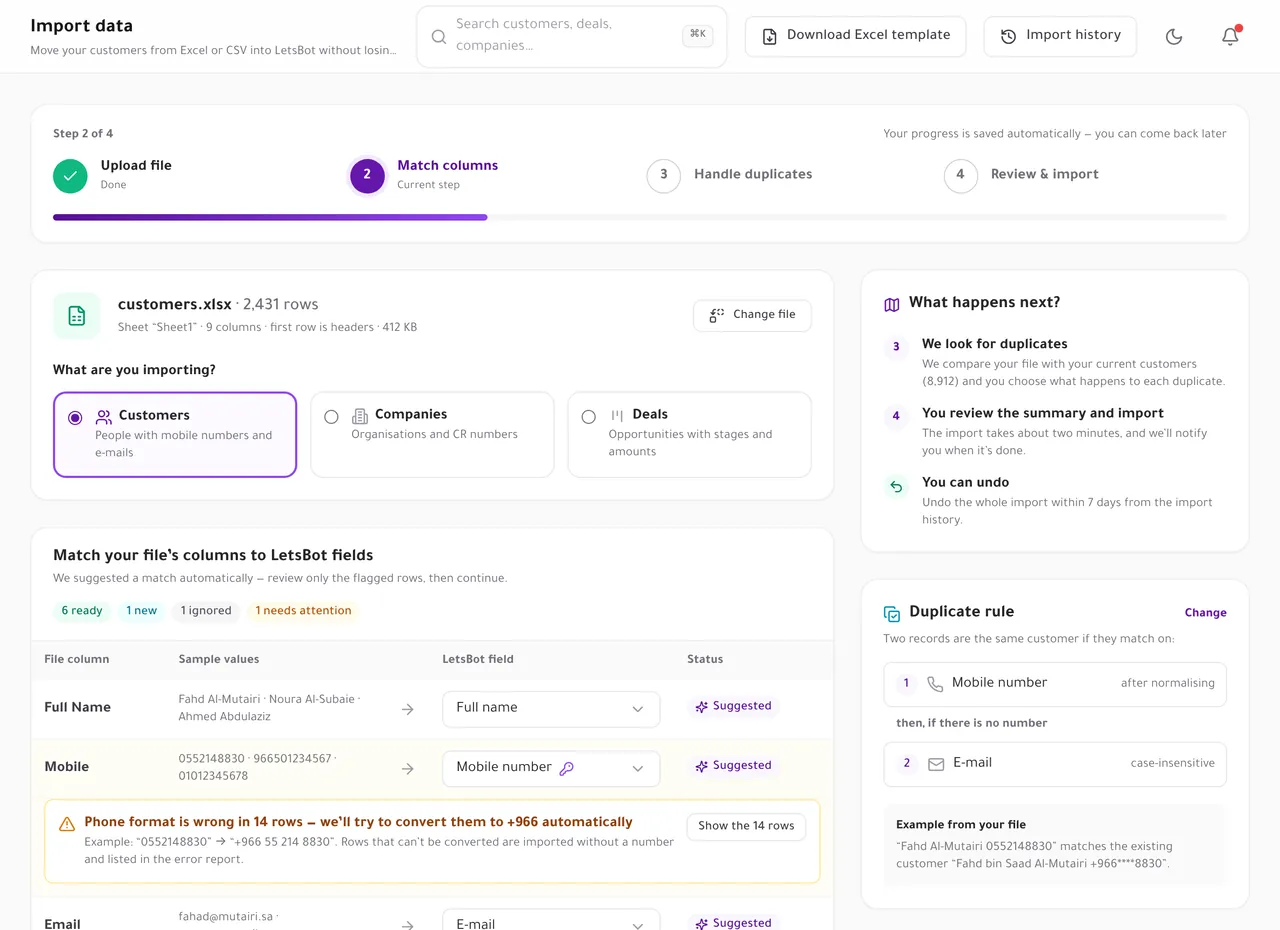
Import from CSV or Excel
Up to 20,000 rows. Match the columns, then review duplicates before anything is saved.
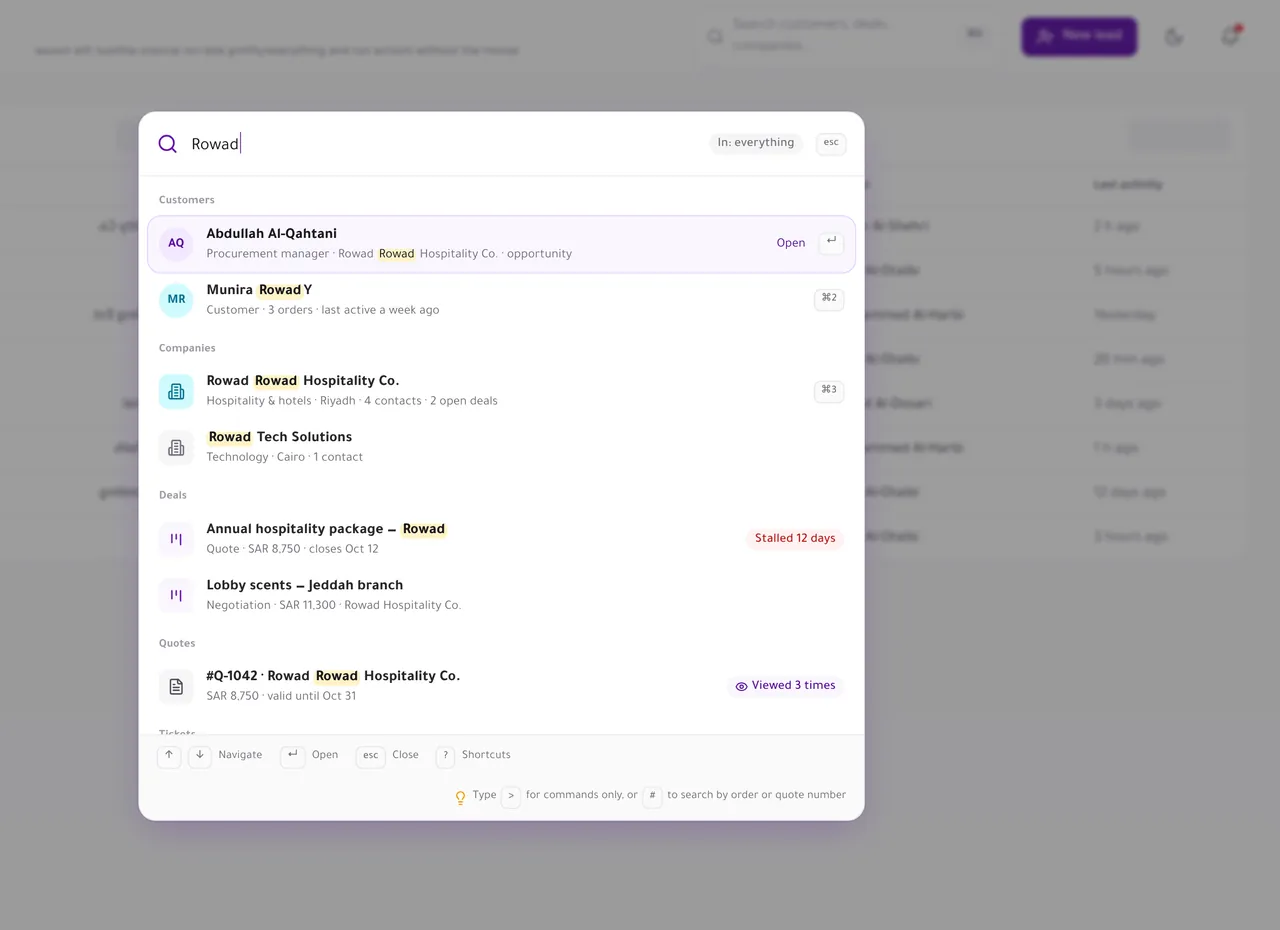
⌘K from anywhere
Find a customer, company, deal or ticket by name, the end of a phone number, an e-mail or a number.
- Import from CSV or Excel (up to 20,000 rows)
- Role permissions: all, team or own records
- Field history on every record
- Products imported from Salla, Zid, Shopify and WooCommerce
- Companies with their linked people
- A CRM card in the live-chat sidebar
- Duplicates and merge — Any merge can be undone for 30 days
Already use a CRM?
Keep it, and sync both ways
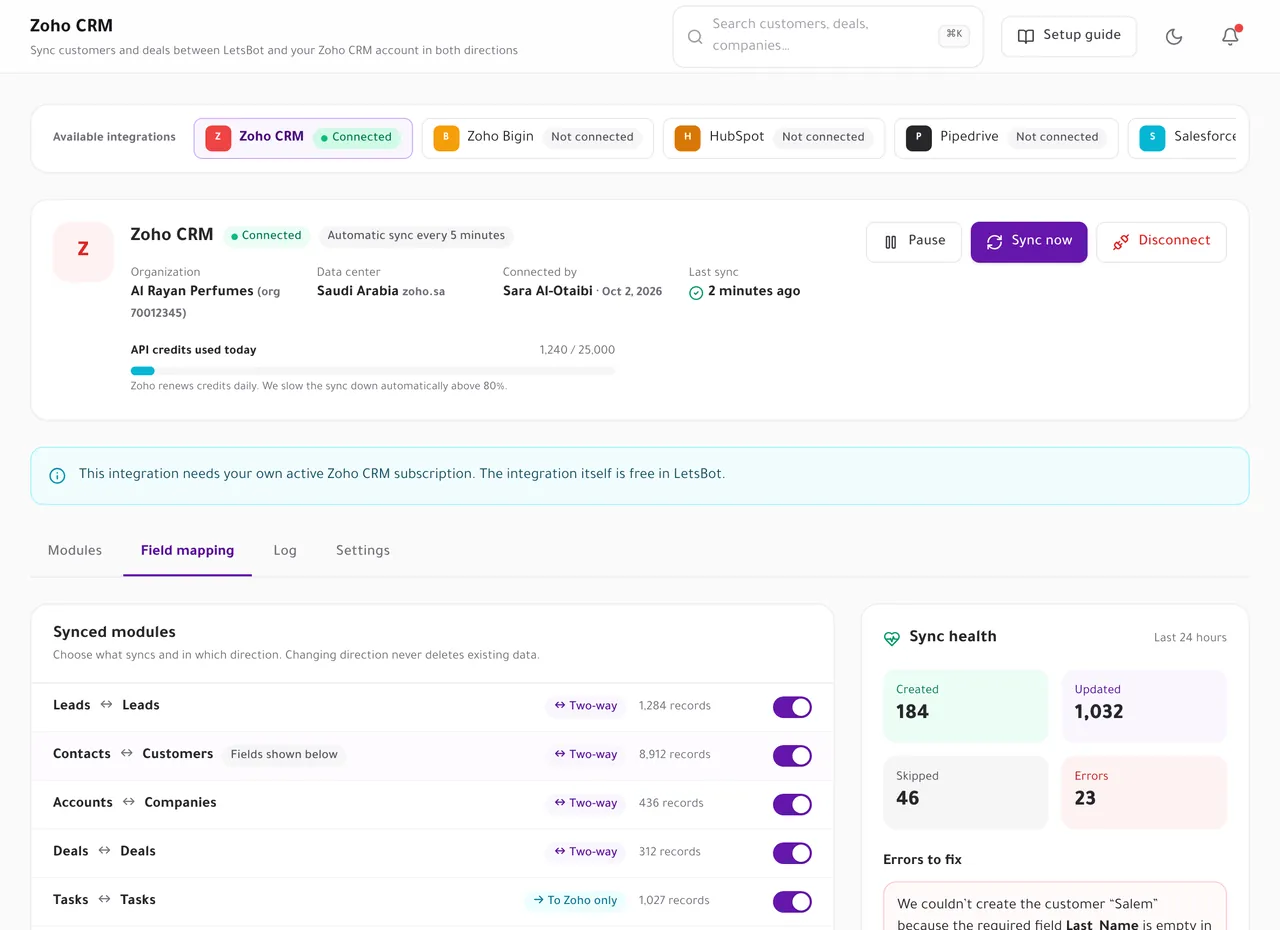
Connect Zoho CRM, Zoho Bigin, HubSpot, Pipedrive or Salesforce. Choose, per module, whether data syncs both ways, only into LetsBot, or not at all.
- Contacts, companies, deals and tasks, with the direction set per module.
- Field mapping, a sync log and errors you can fix from one screen.
- Changing the direction never deletes existing data.
Integrations are free. You need your own subscription to that CRM.
Up and running in four steps
-
Open the CRM
Everyone who has messaged you on a connected channel is already a customer record.
Sidebar → CRM → Overview
-
Import the rest
Upload a CSV or Excel file, match the columns, and see duplicates before anything is saved.
CRM → Import
-
Sell from the chat
Create deals and quotes from the customer card in live chat, and move them on the board.
Live chat → customer card
-
Automate the follow-up
Start from a template: a task when a quote is opened, an owner for every new lead, a reminder for quiet deals.
CRM → Automation
What costs money, and what does not
Free on every plan — Open it from the sidebar → CRM. No extra charge on any LetsBot plan.
The CRM costs nothing. Messages it sends to customers — a quote on WhatsApp, an automation or sequence template — are WhatsApp messages that Meta bills like any other. Every step that messages a customer stays off until you switch it on and confirm the cost. WhatsApp pricing in 2026
Open to your tools and your team
CRM API and webhooks
Read and update contacts, companies, deals, tasks, activities, quotes and products. Signed webhooks report changes as they happen.
Za razvijalceZapier, Make and n8n
Zapier triggers for new contacts, deals, stage changes, wins, losses, tasks and accepted quotes. Make and n8n connect through the API and webhooks.
ZapierIn live chat
The conversation sidebar shows the company, the open deal and its stage, the lead score and the last order, with quick actions.
Klepet v živoClaude and ChatGPT
The LetsBot MCP server includes CRM tools, so your assistant can read the timeline, add a note or list companies.
MCPTypeScript SDK
The official @letsbot/sdk package on npm has typed methods for the CRM API, and the n8n community node covers it too.
Za razvijalceHelp centre
Step-by-step CRM guides
Short articles that walk through each part of the CRM inside your LetsBot account.
- 01 Getting started with the LetsBot CRM Read the guide
- 02 Import customers, companies and deals Read the guide
- 03 Deals and pipelines: forecast, products and follow-up alerts Read the guide
- 04 Quotes: create, send on WhatsApp and track when they are opened Read the guide
- 05 Automation, sequences and what WhatsApp messages cost Read the guide
- 06 Lead score: how the 0–100 score works Read the guide
- 07 CRM reports and dashboards Read the guide
- 08 Connect Zoho CRM or Zoho Bigin with two-way sync Read the guide
Poslovna orodja LetsBot
Orodja, ki skupaj delujejo okoli vsakega pogovora
Vsako orodje je prikazano v profilu stranke znotraj klepeta v živo, zato operater vidi prodajno priložnost, opravilo, zahtevek in rezervacijo, ne da bi zapustil pogovor.
CRMEn zapis o stranki, ponudbe, avtomatizacija in poročila
Prodajne priložnosti in prodajni lijakTabla Kanban z zneski in napovedjo
Naloge in opomnikiOpravilo iz katerega koli sporočila, z opomnikom
Zahtevki in SLAŠtevilke, prioritete in ciljni odzivni časi
Zadovoljstvo strankAnkete CSAT, NPS in CES
Rezervacija terminovStoritve, zaposleni in termini kar iz pogovora
Oddelki in usmerjanjeDelovni čas, izmene in pravila usmerjanja
Frequently asked questions
Is the CRM really free?
Yes. The CRM is part of every LetsBot plan, including the free trial, with no extra charge. WhatsApp messages you send from it are billed by Meta as usual.
Do I need to move my customers into it?
No. Everyone who has messaged you on a connected channel already has a customer record. Import the rest from a CSV or Excel file of up to 20,000 rows.
Can I keep Zoho CRM, HubSpot, Pipedrive or Salesforce?
Yes. Connect it and choose, per module, whether data syncs both ways, only into LetsBot, or not at all. The integration is free; you need your own subscription to that CRM.
Will the CRM message my customers by itself?
No. Nothing is sent until you build an automation or a sequence with a message step, switch it on and confirm the cost. Each one has a daily cap, and customers without marketing consent are skipped.
Is a quote an invoice?
No. A quote is a priced offer with VAT and a QR code in the ZATCA format. The customer can accept or decline it online. LetsBot does not take payment on a quote.
Who sees which records?
Each role has CRM permissions per object and a visibility rule: all records, the team’s records, or only their own. Every field change is kept in the record’s history.
Can my developers build on it?
Yes. The CRM API covers contacts, companies, deals, tasks, activities, quotes and products, and signed webhooks report changes the moment they happen.
Where do I find it?
In the dashboard sidebar under “CRM”: Overview, Customers, Companies, Deals, Quotes, Automation, Reports and the CRM settings.
Sell from the conversation, with every detail in one record
Start your free trial, connect a WhatsApp number and open the CRM from the sidebar.