No separate Viber screen
Viber chats sit beside WhatsApp, Instagram and e-mail, assigned and noted the same way.
Channels & Apps
AI & Automation
Integrations & App Store
Business Tools
Channels · Viber
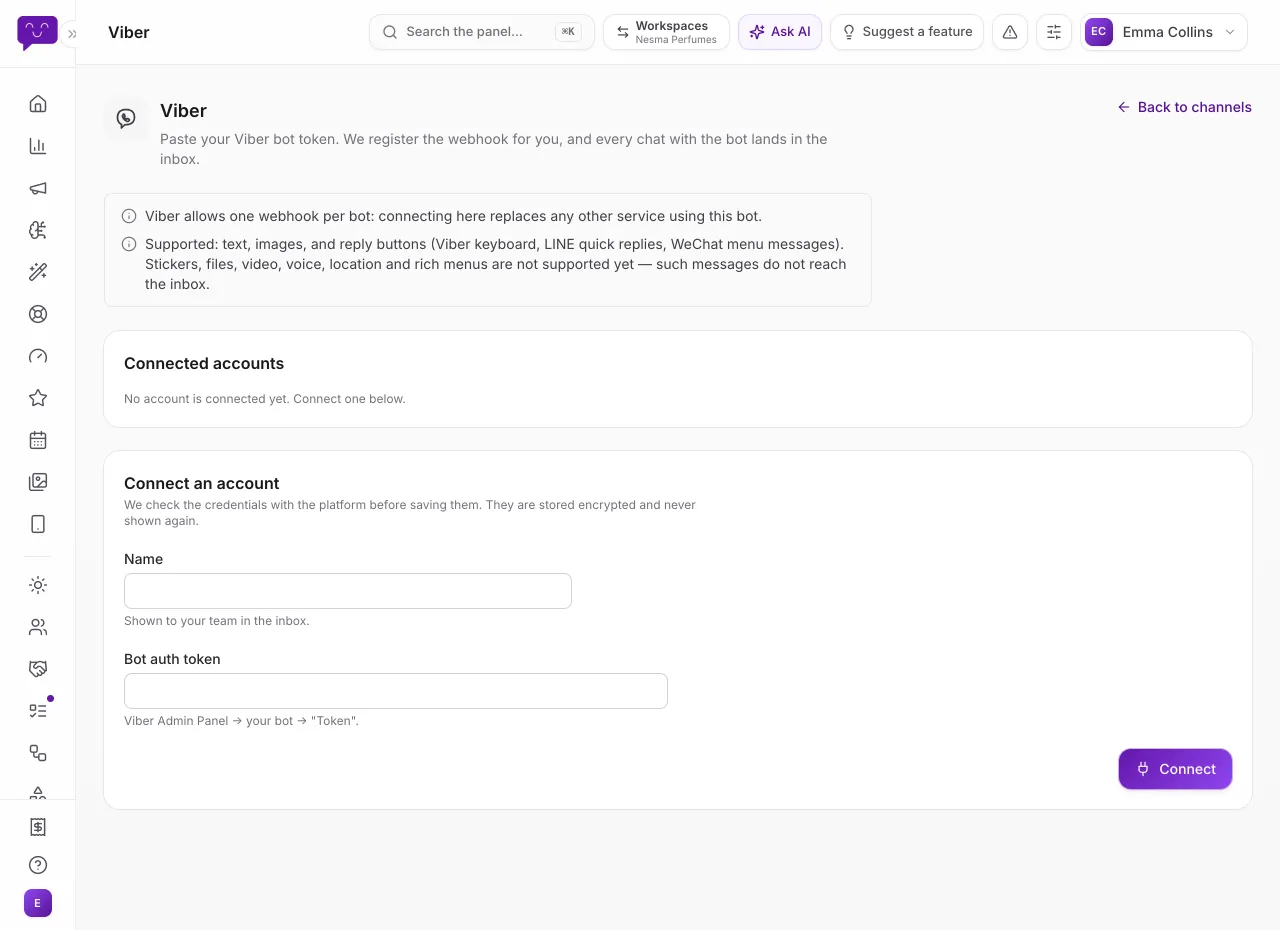
Paste your Viber bot token and LetsBot registers the webhook for you. Every chat with your bot lands in the shared inbox, where your team, your bot flows and your automations answer it.
Part of LetsBot, the AI customer engagement platform built on the official WhatsApp Business API. LetsBot is a verified Meta Tech Provider.
Why connect it
In many countries Viber is the messaging app customers open first. Keep those chats in the inbox your team already uses.
Viber chats sit beside WhatsApp, Instagram and e-mail, assigned and noted the same way.
Your bot flows and workflows answer Viber like any other channel, with reply buttons on the Viber keyboard.
One token, no code: the webhook is registered for you and the connection is checked before it is saved.
What is inside
Connect it in Settings › Channels › Viber.
Customers send text and images; your team answers with both from the inbox.
Bot menus and quick choices appear as the Viber keyboard under the chat.
Assignment, departments, internal notes and quick replies work as on every channel.
Each Viber user becomes a contact you can tag, add to deals and follow up.
LetsBot registers the webhook with Viber when you connect, and shows the connection status.
The token is checked with Viber, stored encrypted and never shown again.
Is it for you
Create a bot in the Viber Admin Panel and copy its token.
Open Settings › Channels › Viber, name the account and paste the token.
LetsBot sets the webhook with Viber and checks the connection.
New Viber chats arrive in the inbox for your team and your bot.
Related
Pricing
Viber channel
US$69
a month for the first bundle, VAT included
Bundles run from US$69 to US$549 a month. Every account starts with a 14-day free trial, no credit card needed.
Bundles differ in team members, monthly messages and AI replies. Connecting Viber is the same in every bundle.
Start a free trial and connect your Viber bot in a minute.
Choose what you allow. You can change this at any time from “Cookie settings” at the bottom of every page. Privacy Policy
Essential
Needed for the site to work and stay secure: session, form protection, language memory and bot checks.
Analytics
Help us understand how pages are used and improve them, through Microsoft Clarity, which records page interactions such as clicks and scrolling.
Marketing
Measure how well our ads work, through Google Ads, the Meta Pixel and ChatGPT ads by OpenAI, including what our servers send to Meta and OpenAI.